The Most Useful Tesla Phone Mount: 2 Genius Mounting Spots You Need to Know
If you're a Tesla owner, especially with a sleek carbon fiber dash like on the Model Y Performance, you've probably struggled with phone mounts that either look tacky or risk scratching your interior. Well, I've found one of the most useful phone mounts out there, and it's a game-changer. Let me break down two killer use cases and mounting locations that make this the highest-quality option I've seen in ages.
Shoutout to the team at Joa – grab yours with promo code Dennis to save some cash (link in the description below)!
Why This Mount Stands Out
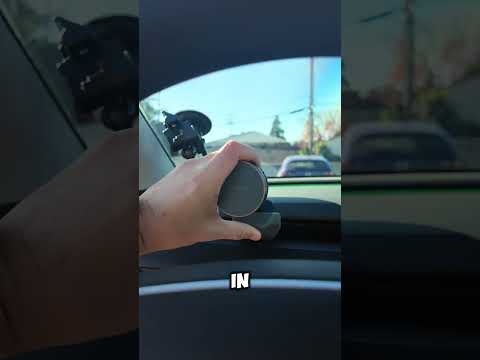
This isn't your average suction cup or vent clip. It clamps securely into the dash without a single scratch. Check out these features:
- Rubber grips on the bottom and sides protect your carbon fiber finish.
- MagSafe compatible for effortless phone or iPad attachment.
- Sleek, low-profile design that blends right in.
No more ugly adhesives or flimsy holders – this one's built to last.
Mounting Spot #1: Driver's Side for Navigation
The first spot is right behind the driver's side steering wheel. Perfect for quick glances at navigation without obstructing your view.
Pop it in, clamp it down, and you're set. Your phone stays rock-solid, even on bumpy roads.
Mounting Spot #2: Passenger Side for Road Trip Entertainment (The Real MVP)
But the second spot is where it shines – passenger side, ideal for your co-pilot (shoutout to my wife!).
- Mount your phone horizontally for movie watching on long drives.
- Add a MagSafe ring to an iPad for a massive screen experience.
Road trips just got way more enjoyable. Kids happy, passengers entertained, zero distractions for you.
Why This is the Highest-Quality Mount I've Tested
I've tried dozens, but this one's premium build, smart design, and versatility put it at the top. It respects your Tesla's interior while delivering function.
Ready to upgrade? Head to Joa, use promo code Dennis, and transform your drives. Drop a comment: What's your go-to road trip gadget?
Stay tuned for more Tesla hacks – subscribe to DennisCW on YouTube!