Tesla Model Y Center Console Upgrade: Installing the Joah USB Hub
If you're driving a Tesla Model Y and find yourself short on USB ports or need a little extra light in the center console, I've got the perfect accessory for you. Today, I'm diving into the Joah USB Hub – one of my absolute favorites for adding serious functionality without sacrificing that sleek Tesla aesthetic. Let's unbox it, break down the features, and walk through the super-easy install step by step.
Unboxing and Features
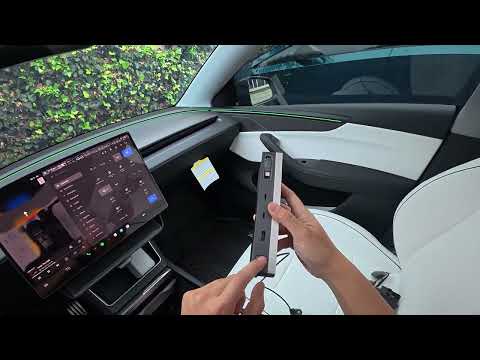
Right out of the box, this hub screams quality. It's designed specifically for the Tesla Model Y and packs a ton of utility:
- 2x Standard USB ports for everyday charging.
- 2x USB-C ports, including one beefy 100W USB-C for fast-charging laptops or power-hungry devices.
- Built-in LED light – perfect for digging around in the dark console at night. Just tap the button to toggle it on.
- Retractable USB cable for quick access and tidy storage.
- Powered via the hidden cigarette lighter port at the bottom of the center console.
What I love most? It uses the factory rails for a flush, OEM-like fit. No rattles, no bulk – it just belongs there.
Easy OEM-Style Installation
Installing this takes about 2 minutes. Here's how:
- Locate the hidden cigarette lighter port at the very bottom of the center console.
- Plug in the hub's power cable – it draws from that port, freeing up space elsewhere.
- Slide it into the factory rails – it snaps in perfectly, like it came from Tesla.
- Pull out the retractable USB when needed, or tuck it away for a clean look.
Watch it in action:
Close the console lids, and boom – it looks factory-fresh. Extra ports, light, and power without any visual clutter.
Why This is a Must-Have Mod
In my Model Y, this hub has been a game-changer. Charging phones, tablets, or even powering a dash cam is effortless now. The 100W USB-C is clutch for road trips, and that light? Nighttime lifesaver.
It's not just functional – it's elegant. No cheap aftermarket vibes here.
Grab Yours Today!
Ready to level up your Tesla? Check out the Joah USB Hub here. Use promo code DENNISCW for savings and free shipping!
What mods are you running in your Model Y? Drop a comment below – love hearing your setups!
Safe drives, Tesla fam! 🚀
DennisCW – Your go-to for Tesla tips, mods, and reviews.