Tesla Premium Connectivity: Is It Worth $10/Month? 3 Smart Ways to Save Money
Hey everyone, DennisCW here! If you just picked up a new Tesla, you're probably enjoying that 30-day free trial of Premium Connectivity. But now you're wondering: Is it really worth the $9.99/month or $100/year after that? What features do you actually get, and are there ways to save money without losing out?
I used to be 100% against paying for it. I've even made videos showing how I skipped the fee entirely. Today, I'll break down the features, share my current setup with multiple Teslas (including my Model X, where I went months without paying), and reveal three better alternatives that could save you cash and give you more flexibility.
What Do You Get with Tesla Premium Connectivity?
Premium Connectivity unlocks a bunch of perks over standard connectivity:
- Music streaming (Spotify, Apple Music, etc.) over cellular or Wi-Fi
- Karaoke and video streaming (Netflix, YouTube, etc.)
- Live traffic visualization on maps
- Satellite-view maps for that detailed, bird's-eye navigation
It's seamless and convenient—no extra setup needed. But here's the thing: most of these can be replicated with your own internet source. Satellite view is the main exception (it shows terrain, parking lots, greenery—super helpful for scouting spots, but some prefer the standard map).
My Journey: From Skipping It to Weighing the Options
With my Model X, I ditched Premium Connectivity for months using hacks. Now with the Cybertruck and others, I've tested everything. Premium is nice, but if you're budget-conscious or want internet for other devices, alternatives win.
Alternative #1: Phone Hotspot (Often Free!)
The simplest hack? Turn your phone into a hotspot. Many plans (like T-Mobile) include unlimited hotspot data.
- Enable hotspot on your phone.
- Set your Tesla to auto-connect (I trigger mine with the action button for instant switching).
Pros: Free, works for all features except satellite maps. Cons: Drains phone battery; data limits on some plans.
Boom—$10 saved, no hassle.
Alternative #2: Dedicated Hotspot Device
Level up with a standalone hotspot like the AT&T Netgear. Plug it into your Tesla via USB-C for constant power.
- Stable connection for Tesla and other devices (laptop, tablet).
- Portable—take it anywhere.
Cost: Often cheaper than $10/month depending on your carrier plan. Way more versatile than Tesla's service.
Alternative #3: Starlink Mini (The Game-Changer)
Okay, hear me out—this one's epic. Starlink Mini prices have dropped to $250–$299 (use my referral link for a free month!).
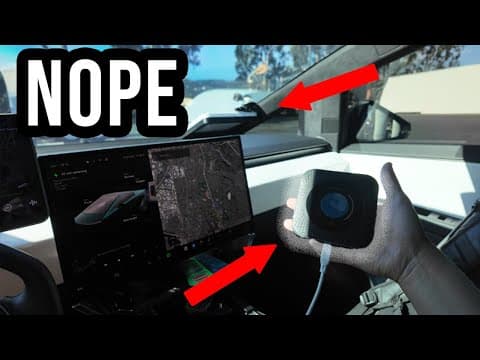
I've got mine mounted on the Cybertruck dash with a Veritus mount (suction cups for glass roof). Planning a Unplugged Performance roof rack next for anti-theft.
Plans:
- $5/month standby: Unlimited low-speed data (up to 500 Kbps)—enough for maps, streaming.
- Roaming options for travel.
Pros: Works everywhere (even remote areas), multi-device, future-proof. Payback: One-time cost + low monthly beats Tesla long-term.
 My current Starlink Mini setup—might relocate to the roof soon!
So, Is Premium Connectivity Worth It?
For most? No. If you drive a lot solo and love seamlessness, maybe. But these alternatives are cheaper, more flexible, and usable beyond your Tesla.
What about you? Phone hotspot, dedicated device, or Starlink? Drop a comment—which would you try to ditch the $10 fee?
If this helped, like the video, subscribe for more Tesla tips, and check my channel for the full demo. See you next time!
DennisCW 🚀